🔍 Full Review
FlexiSpot E7 Standing Desk
Updated September 2026
🛒 View the E6 MAX on Amazon →* Affiliate links — we earn a commission if you buy, at no extra cost to you. It never changes which products we recommend.
⚡ FlexiSpot E7 Review — Quick Verdict
| ⭐ Rating | 4.7 / 5 |
| 🏆 Best for | Daily sit-stand users, dual monitor setups |
| ⚙️ Motor | Dual motor — very stable at height |
| 🏋️ Load capacity | 220 lbs / 100 kg |
Key specs at a glance
| Motor | Dual motor, 1.5″/sec lift speed |
| Weight capacity | 355 lbs |
| Height range | 22.8″ – 48.4″ (T-frame) |
| Desktop sizes | 48×24 up to 80×30 (multiple options) |
| Frame type | T-frame (adjustable width) |
| Noise level | Under 50 dB |
| Presets | 4 programmable heights + USB-A port |
| Warranty | 15 years (frame + motor) |
What owners report about setup
Let’s address the elephant in the room first: this desk is heavy. Like, “text your friend for help” heavy. It arrives in two boxes — one for the frame, one for the desktop — and the frame box alone is what turns up again and again in delivery complaints.
That said, the weight is what owners end up praising. Next to the lighter budget frames reviewers describe as swaying under normal use, the E7’s steel legs are the first thing people mention. That heft shows up in review after review.
Assembly time in reviews clusters around 45 minutes working solo, which is pretty standard for standing desks in this class. The instructions are clear enough — everything’s labeled, the Allen wrench is included, and the pre-drilled holes actually line up (you’d be surprised how often they don’t with cheaper desks). The one step that trips people up in reviews is the cable management tray — the instructions for that part are weirdly vague. It basically clips under some screws, but the diagram makes it look way more complicated than it is. Pro tip: just slide it under the screw heads and you’re done.
You’ll want a Phillips head screwdriver or, better yet, a power drill with a Phillips bit. Technically optional, but your wrists will thank you.
How the E7 holds up day to day
Stability: the thing that matters most
This is where the E7 earns its reputation. At sitting height (around 28-30 inches), this desk doesn’t budge. Not a millimeter. It feels like a regular solid desk — you’d never know it could move.
At standing height — around 44 inches for most owners — reviewers report the tiniest bit of sway if you actively try to push the desk. And I mean actively try — lean into it with your body weight, push the edge. During normal use — typing, mousing, even aggressive typing when you’re annoyed at an email — nothing. The dual motors and carbon steel frame genuinely make a difference versus the single-motor budget desks in this bracket.
For context: a typical loaded setup in these reviews runs a 27-inch monitor on an arm, a laptop on a stand, a desk lamp, a USB microphone and assorted clutter — call it 45–50 lbs. Owners consistently report the desk doesn’t notice. It lifts and lowers like there’s nothing on it.
Motor and noise: the Zoom call test
The dual motors move at 1.5 inches per second, which means going from sitting to standing takes about 10-12 seconds. Noticeably faster than the single-motor desks (the FlexiSpot EC1 does about 1″/sec). In daily use, the difference feels bigger than the numbers suggest — you hit the button, and it’s there.
Noise-wise, FlexiSpot claims under 50 dB, and owner reports line up with that. The motors produce a low hum that owners consistently describe as quieter than a desk fan. Owners routinely mention switching positions mid-call without anyone on the other end noticing. The only sound that occasionally registers is a very faint “click” when the desk reaches the preset height and stops — but even that’s subtle.
The keypad: simple but effective
Four programmable presets, up/down arrows, and a USB-A charging port. That’s it. No app, no Bluetooth, no over-engineered smart features. That simplicity gets praised more than you would expect — the fewer things that can break or need updating, the better.
Most owners describe programming two presets — roughly 29 inches for sitting and 44 for standing — and leaving the spare two for a partner or a second chair. One-touch switching is genuinely life-changing after a few days — you stop thinking about it and just tap the button whenever you feel like switching. The USB-A port is handy for keeping a phone charged, though the recurring gripe in reviews is that it isn’t USB-C.
Desktop and customization
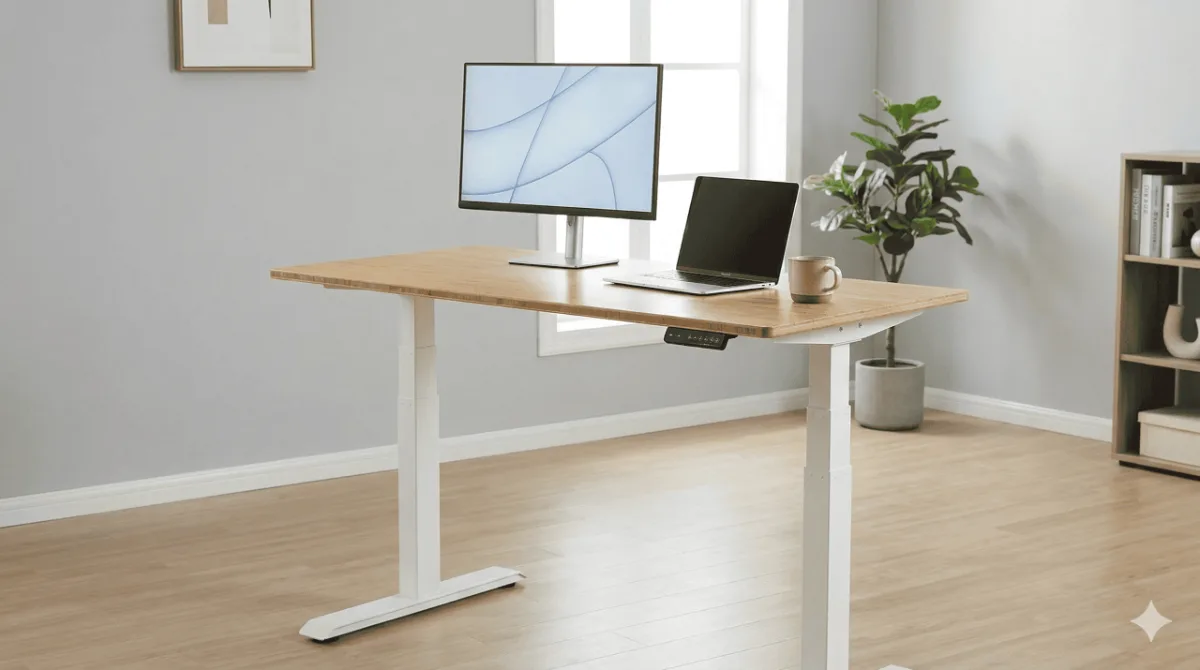
FlexiSpot offers a dizzying number of desktop options: bamboo, dark bamboo, chipboard in various colors, and solid wood. The 55×28 bamboo is the configuration that shows up most in owner photos — smooth grain, and reviewers months in report it hasn’t stained or scratched. The bamboo also has the benefit of being more sustainable than chipboard, if that matters to you.
The adjustable frame width means you can pair the E7 with desktops from 48 to 80 inches wide, including third-party tops. Some people buy the frame only and use an IKEA countertop or a custom butcher block — the mounting holes are standard and well-documented.
Cable management: the E7’s weakest spot
Let’s be real — cable management on the standard E7 is just okay. The included cable tray is a basic metal spring-clip affair that holds cables but doesn’t hide them elegantly. It works, it’s functional, but if you’re the type who wants a perfectly clean desk setup, you’ll want to invest in a separate cable management solution.
This is actually the biggest reason to consider the E7 Pro instead — the Pro has a magnetic fabric cable cover that snaps onto the frame and completely hides everything. If cable aesthetics matter to you, the premium for the Pro might be worth it just for that feature alone.
Pros and cons
What I like
- Rock-solid stability at all heights
- Dual motors — fast, quiet, smooth
- 355 lb capacity with headroom to spare
- 15-year warranty (best in class)
- Huge range of desktop options
- Height range works for most people (5’0″ to 6’4″)
- Programmable presets are a daily time-saver
What could be better
- Cable management is basic (Pro is much better)
- Heavy — solo assembly is doable but tough
- T-frame crossbar can bump taller users’ knees
- USB-A port instead of USB-C in 2026
- Desktop can arrive separately (1-3 days apart)
- FlexiSpot customer service is inconsistent
Who should buy the FlexiSpot E7
You’ll love it if: You want a standing desk that you can set up once and trust for years. You have a multi-monitor setup or plan to add more equipment over time. You want the flexibility to choose your own desktop size and material. You appreciate quiet operation and don’t want to disturb coworkers or family members.
You should skip it if: You’re on a tight budget — check out the FlexiSpot EC1 in our budget roundup instead. You’re under 5’0″ and need the desk to go very low — the E7 Pro with its C-frame might be a better fit. You’re obsessive about cable management and don’t want to DIY a solution — consider the E7 Pro for its magnetic cable cover.
UPLIFT V3 The premium alternative if stability is everything →How it compares
FlexiSpot E7 vs E7 Pro (a step up in price): The Pro gets you a C-frame (more legroom), 440 lb capacity, better cable management, and a slightly higher max height. Worth the upgrade if you’re tall, have a heavy setup, or care about cable aesthetics. For most people though, the standard E7 is plenty.
FlexiSpot E7 vs EC1 (the cheaper option): The EC1 is a solid budget pick — we named it best overall in our under-$300 roundup. But the jump from EC1 to E7 is significant: dual motors, 2x the weight capacity, better stability, and a 15-year warranty vs 5 years. If your budget allows, the E7 is worth the step up.
FlexiSpot E7 vs UPLIFT V3 (similar price): The UPLIFT V3 is the E7’s closest competitor. Both have dual motors and similar specs. Uplift edges ahead on customization options and customer service reputation. FlexiSpot wins on price — the E7 is typically the mid-range bracket less for comparable configs. It’s genuinely a toss-up, and you’d be happy with either.
Final verdict: is the FlexiSpot E7 worth it?
After going through several thousand owner reviews, here’s my honest take: the FlexiSpot E7 is the best standing desk for most hybrid workers. Not the absolute best standing desk that exists — that title probably goes to something in the premium range — but the best one when you factor in what you actually get for what you pay.
The dual motors are smooth and quiet. The stability is excellent. The 355 lb capacity means you’ll never outgrow it. And the 15-year warranty shows that FlexiSpot actually stands behind this product (pun intended).
The only real complaints — basic cable management and a USB-A port — are minor inconveniences, not deal-breakers. If those bother you, the E7 Pro fixes both.
If I were spending my own money on a standing desk today, knowing what I know after researching dozens of options, I’d buy the E7 in the 55×28 bamboo configuration. No hesitation.
Last updated: March 2026. Looking for more options? Check our best standing desks under $300 for budget picks.
FlexiSpot E7 Standing Desk
Across the review corpus the E7 is the desk that keeps clearing the bar most buyers actually care about: it does not sway at standing height under a loaded desktop, the dual motors stay quiet enough for live calls, and the 15-year frame warranty is the kind of backing budget desks do not offer. The two recurring gripes — a basic cable tray and a USB-A port instead of USB-C — are annoyances, not reasons to look elsewhere.
Check the E6 MAX on Amazon →Frequently Asked Questions
How does the FlexiSpot E7 compare to a Herman Miller standing desk?
The FlexiSpot E7 and Herman Miller Nevi (premium tier) are very different price points. The E7 offers better value: comparable motor quality, stronger warranty coverage, and equivalent stability for most users. The Herman Miller adds premium aesthetics and brand cachet. For pure function-per-dollar, the E7 wins. The Herman Miller is for users who want a cohesive premium office aesthetic.
Does the FlexiSpot E7 have a weight limit?
The FlexiSpot E7 supports up to 220lbs (100kg) of desk surface weight. In practice, even a heavy dual-monitor setup with a desktop PC, accessories, and a large tabletop rarely exceeds 80–100lbs. The E7’s weight capacity is one of the highest in its price class and should not be a limiting factor for home office use.
Is the FlexiSpot E7 noisy when adjusting height?
The E7’s dual motors produce approximately 45–50dB during adjustment — comparable to a quiet conversation. It’s not silent, but it’s not disruptive in a home office. The adjustment cycle takes 15–20 seconds from seated to standing height. Most users report the motor noise is acceptable and quieter than expected.
What tabletop size works best with the FlexiSpot E7 frame?
The E7 frame accommodates tabletops from 48″ to 80″ wide and 24″ to 35″ deep. The most popular pairing is a 60″ x 30″ tabletop, which balances workspace and room footprint. UPLIFT, Flexispot’s own tabletops, and third-party solid wood tops from local suppliers all fit the E7 frame. Measure your room first — a 60″ desk needs at least 65″ of clear wall space.
📚 Related Articles
✅ Ready to get the FlexiSpot E7?
Check current availability — stock and deals change often
View the E6 MAX on Amazon →⚡ FlexiSpot E7 vs the competition — Quick Comparison
| Product | Rating | Weight Capacity | |
|---|---|---|---|
| FlexiSpot E7 🏆 | Dual motor | 355 lbs | View the E6 MAX on Amazon → |
| UPLIFT V3 | Dual motor | 355 lbs | See Current Price → |
| VARI Electric | Single motor | 200 lbs | View on Amazon → |
| Fezibo Electric | Dual motor | 176 lbs | Check Availability → |