The Logitech Lift vs MX Vertical question comes down to something spec sheets bury: how big your hand is. Both tilt your hand to the same 57-degree angle, so the real split is size, power, and noise. Before you decide, skim our guide to the best ergonomic mouse for wrist pain for the wider field of vertical mice.
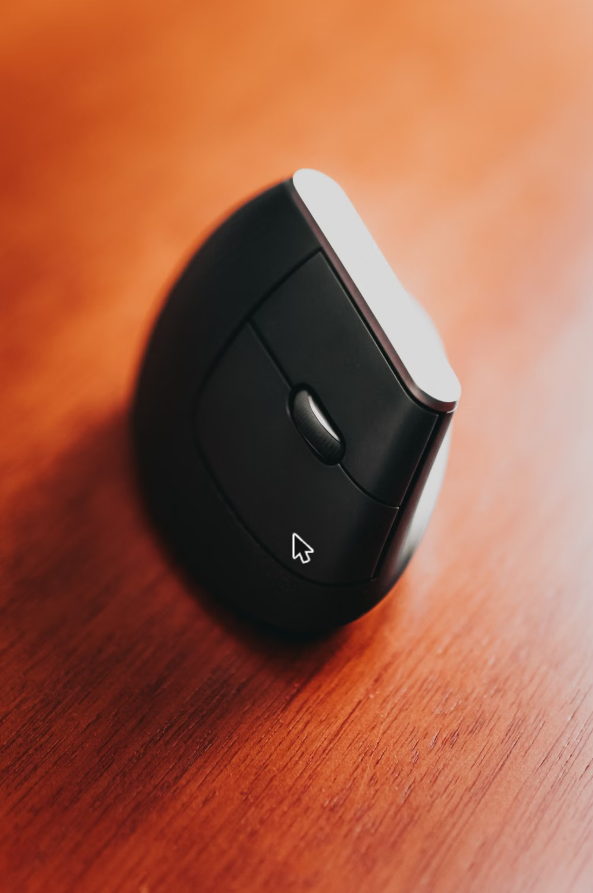
If you’re reading this, you’ve probably already accepted that a flat mouse is wrecking your wrist and you’re down to two Logitechs that look suspiciously similar on a shelf. Same brand, same 57-degree tilt, same “vertical mouse” label. So why are they sold side by side? That is the whole Logitech Lift vs MX Vertical puzzle.
I went through the spec pages, independent comparisons, and the way thousands of owners describe each mouse, and the answer is less about features than about your hand. The Lift and the MX Vertical split along size, power, and noise – and once you know which of those matters to you, the choice mostly makes itself.
Logitech Lift vs MX Vertical: Quick Verdict
Logitech Lift vs MX Vertical: your hand size decides
Small to medium hands, a quieter desk, and a mouse you never have to plug in: get the Lift. Medium to large hands and you want a bigger body with a rechargeable battery: get the MX Vertical. Not sure where your hand falls? The Lift is the safer starting point, because Logitech builds it for small-to-medium hands and reviewers warn that larger hands get cramped.
Check Price on Amazon →Logitech Lift vs MX Vertical: Side-by-Side Specs
| Feature | Logitech Lift | Logitech MX Vertical |
|---|---|---|
| Vertical angle | 57° | 57° |
| Built for | Small to medium hands | Medium to large hands |
| Size and weight | Smaller and lighter | Larger and heavier |
| Power | One AA battery | Built-in rechargeable battery (USB-C) |
| Battery life (as reported) | Up to roughly two years on one AA | Around four months per full charge |
| Clicks | Quiet-click design (per Logitech) | Not marketed as quiet |
| Left-handed version | Yes, sold as Lift Left | Right-handed design |
| Software | Logi Options+ | Logi Options+ |
| Extras | Thumb rest, recycled plastic | Thumb rest, dedicated cursor-speed button |
Battery figures are manufacturer or reviewer estimates and change with how you use the mouse. Check the current listing for the latest specs.
The Mice, One at a Time
The Lift is Logitech’s answer to a problem the MX Vertical created: not everyone has a hand big enough to wrap around it. Logitech designs the Lift for small to medium hands, with a soft-textured grip and a thumb rest, and sells a separate left-handed version – something the MX Vertical doesn’t offer.
Across the review summaries I went through, the praise is consistent: comfort, wrist comfort, and build quality come up again and again, and plenty of owners call it the best vertical mouse they’ve used. The clicks are also a selling point – Logitech markets them as whisper-quiet, which matters if you share a room or take calls from a bedroom office.
The complaints are narrower but real. A recurring theme is click reliability, with some owners reporting a left click that doesn’t always register, and a smaller group mentions Bluetooth connection hiccups. Reviewers also warn that if your hands are large, the Lift will feel cramped – that isn’t a defect, it’s the design.
- 57-degree tilt with a thumb rest for a neutral handshake position
- Built for small-to-medium hands, with a left-handed version available
- Quiet-click design
- Runs on a single AA battery, so no charging routine
- Large hands report a cramped fit
- Some owners report left-click and connection problems
- Needs Logi Options+ for customization
- Value for money splits owners down the middle
The MX Vertical is the older, larger, more “premium” of the pair. It has the same 57-degree tilt, a contoured body with a textured rubber surface, and a thumb rest, but it’s built around a bigger hand than the Lift and comes in a right-handed shape only.
The feature people actually mention is the power setup. Instead of a replaceable battery, the MX Vertical charges over USB-C, and reviewers describe it lasting for months per charge with a short top-up giving hours of use. It also has a dedicated cursor-speed button, which is handy if you move between a laptop screen and a larger monitor.
On the downside, it’s the heavier, bulkier option, and independent comparisons note it isn’t a great choice for gaming. Because it’s priced as a premium product, reviewers tend to judge it harder on value than they do the Lift.
- Roomier body suits medium-to-large hands
- Rechargeable over USB-C, no batteries to buy
- Dedicated cursor-speed button and customizable buttons
- Praised for build quality
- Larger and heavier than the Lift
- Right-handed only
- Not ideal for gaming
- Needs regular charging, unlike an AA-powered mouse
Logitech Lift vs MX Vertical, Category by Category
Hand Fit
This is the whole game. Logitech positions the Lift for small-to-medium hands and the MX Vertical for medium-to-large. A vertical mouse that’s too small makes your fingers curl; one that’s too big makes you stretch. Neither is comfortable for a full workday, so pick for your hand, not for the logo.
Noise
The Lift is the quiet one on paper – Logitech sells its clicks as whisper-quiet. The MX Vertical isn’t marketed that way. If you work near someone, or take a lot of calls, that gap is worth weighing.
Power
This is a lifestyle choice more than a spec. The Lift takes one AA battery, which reviewers say can last up to roughly two years. The MX Vertical charges over USB-C, with reports of around four months per charge. If you hate remembering to charge things, the Lift wins; if you hate buying batteries, the MX Vertical does.
Buttons and Software
Both use Logi Options+ to customize buttons. The MX Vertical adds a dedicated cursor-speed switch, which is a small thing you’ll use more than you expect if you bounce between displays.
Reliability
Neither mouse is immune to complaints. The Lift’s most common issues are click response and connectivity; the MX Vertical’s are mostly about size, weight, and value. I couldn’t find a pattern that makes one clearly safer than the other, so buy from somewhere with an easy return.
Pick the Lift If…
- Your hand is small to medium and the MX Vertical looks oversized.
- You’re left-handed – the Lift Left exists, the MX Vertical doesn’t.
- You want quieter clicks.
- You’d rather swap an AA battery than manage a charging cable.
Pick the MX Vertical If…
- Your hand is medium to large and you want a body that fills it.
- You like rechargeable gear and don’t mind a USB-C cable.
- You want a dedicated cursor-speed button.
- You prefer a heavier, more planted feel.
Buying Guide: What to Check Before You Order
1. Be honest about your hand size
Most regret in this category is a size mismatch. If you’re between sizes, start with the Lift – it’s the one Logitech and reviewers flag for fit problems in one direction only (too small for big hands).
2. Expect an adjustment period
Owners commonly describe a few days of awkwardness with any vertical mouse. Give it a week before you judge.
3. Treat it as comfort, not medicine
A vertical mouse can feel more neutral, but it isn’t a treatment. If you have ongoing wrist pain, talk to a clinician.
FAQ
Final Verdict: Logitech Lift vs MX Vertical
Pick by hand size, then by battery preference
The Lift is the better fit for smaller hands, quieter offices, and left-handers. The MX Vertical is the better fit for larger hands and people who prefer a rechargeable, heavier mouse. Both tilt your hand the same 57 degrees, so comfort comes down to how well the body fits you.
View on Amazon →Quick Takeaways
- In the Logitech Lift vs MX Vertical matchup, both mice share the same 57-degree angle – fit is the real difference.
- The Lift suits small-to-medium hands; the MX Vertical suits medium-to-large.
- Lift: AA battery and quieter clicks. MX Vertical: USB-C rechargeable.
- Left-handed? Only the Lift has a left version.
- Neither is a gaming mouse, and neither is a medical device.
Sources I used: Logitech Lift product page, Logitech MX Vertical product page, and Interesting Engineering’s comparison.
That is the Logitech Lift vs MX Vertical call in one line: small-to-medium hands and a quiet desk point to the Lift, while bigger hands and a rechargeable battery point to the MX Vertical. If you are still weighing a budget rival, our Logitech MX Vertical vs J-Tech Digital comparison shows how the MX Vertical holds up.