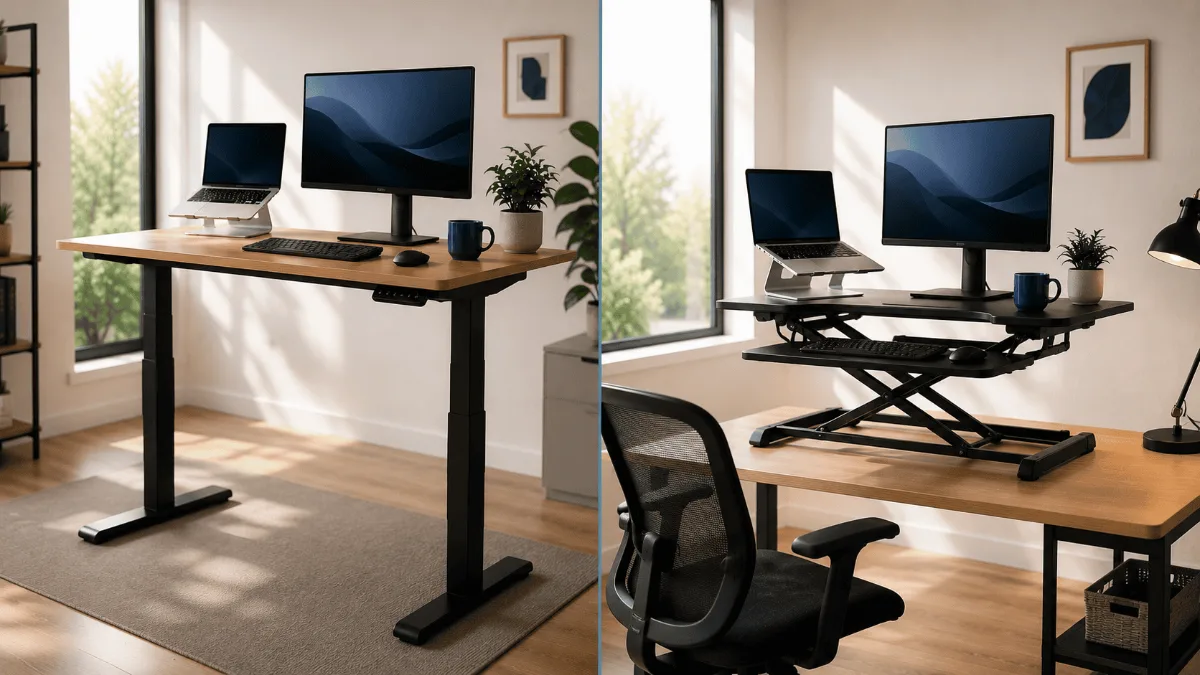
The standing desk vs converter question usually gets answered by budget, and that is the wrong axis. The real deciding factors are how much desk surface you can afford to lose, whether your current desk is the right height to begin with, and how often you will actually switch positions.
⚡ Standing desk vs desk converter — which is right for you?
| 🏆 Buy a standing desk if | You have the budget for a full desk and sit for 6h+ daily — long-term health ROI |
| 💰 Buy a converter if | Renting, tight on space, or want to test standing before committing |
| ⚠️ Avoid | Manual crank desks — you’ll stop adjusting after week 2 |
Trying to choose between a standing desk vs standing desk converter? You’re not alone — it’s one of the most common questions in the home office space. A standing desk replaces your current surface entirely, while a standing desk converter sits on top of what you already own. Each approach has real trade-offs around space, budget, and long-term comfort. If you’re also building out the rest of your setup, check out our best webcams for Zoom meetings guide next.
You want to stand more during the day. Makes sense. But now you’re stuck on the first real decision: do you replace your whole desk, or just put a riser on top of the one you already have?
Both options get you off your seat. The differences are in stability, cost, desk space, and how serious you are about the whole standing thing. I went through hundreds of owner reviews on both categories and there are some pretty clear patterns worth knowing before you spend anything.
This breakdown covers the two main products I’d point someone to in each category — the FlexiSpot E6 MAX for full standing desks and a Fezibo Electric Standing Desk for a more budget-friendly full-desk entry — plus an honest look at when a converter actually makes more sense.
Quick Verdict
FlexiSpot E6 MAX Standing Desk
If you’re committed to standing regularly and want something that won’t wobble when you type hard, the E6 MAX is the desk I’d point most people to. Dual motors, 275lb capacity, anti-collision — it’s built like it means business. Owner reviews are consistently positive and the stability complaints are nearly nonexistent compared to competitors at this tier.
Side-by-Side: Full Desk vs Converter
| Feature | Full Standing Desk | Standing Desk Converter |
|---|---|---|
| Desk space | Full surface, nothing lost | Reduced — riser takes up footprint |
| Stability | Very stable, especially dual-motor | Can wobble at height on cheap models |
| Setup effort | 30–60 min assembly | Unbox and place, minimal setup |
| Portability | Not portable, heavy legs | Can move desk to desk |
| Ideal for | Dedicated home office | Renters, shared spaces, casual users |
| Get it | FlexiSpot E6 MAX | — |
The Case for a Full Standing Desk
A full electric standing desk replaces your existing surface entirely. You get the whole desk surface in whatever position you’re working — sitting, standing, or somewhere in between. The motor handles the lift, and most decent ones can move a full load of monitors, a laptop, and accessories without straining.
The main owner feedback I kept seeing across full desks: once people switch, almost none of them go back to a static desk. The ability to have their entire workspace at the right height — not just a raised platform in the middle of it — makes a meaningful difference for long days.
The FlexiSpot E6 MAX shows up in roughly four out of five “best standing desk” roundups I came across while researching this article, and the owner review patterns explain why. Stability is the top compliment — reviewers with dual-monitor setups regularly note there’s no noticeable wobble even at full standing height, which is not something you can say about single-motor competitors.
Anti-collision is a feature that sounds minor until you’ve watched a keyboard tray slam into a drawer. The E6 MAX will stop and reverse if it hits something on the way up or down. Reviewers with kids or pets in the home mention this specifically as a reason they chose it.
Assembly time in reviews clusters around 30 to 45 minutes for one person. A couple of reviewers mention it’s easier with two people just for flipping the frame, but it’s manageable solo. The desk weighs around 72 lbs, so keep that in mind for any rearranging later. If you want the full breakdown, I’d point you to our detailed FlexiSpot E6 MAX review.
- Dual motors mean much better stability than single-motor desks
- 275lb capacity handles heavy multi-monitor setups easily
- Anti-collision adds real peace of mind
- 4 memory presets mean no re-adjusting every session
- 72 lbs is heavy — moving it after assembly takes effort
- Assembly takes 30–45 minutes, not a quick unbox
The Fezibo gets solid reviews for what it is: an affordable way into the full standing desk category. Owners consistently mention the cable tray as a nice touch at this price point — it ships in the box instead of being a paid add-on. Three memory presets cover most people’s needs for sit and stand positions.
The single motor is slower and the 70lb weight capacity is the main limitation. If you’re running dual monitors or a heavy ultrawide, you’d want to check your setup weight carefully. Reviewers with basic laptop-plus-single-monitor setups report no issues, but the one-in-five complaints about wobble at full extension almost always come from users who’ve loaded it up.
- Cable tray included is a genuine plus at this tier
- 3 memory presets cover the basics well
- Assembly reported as easier than most competitors
- Single motor is noticeably slower than dual-motor desks
- 70lb cap limits heavy dual-monitor setups
- No anti-collision feature
The Case for a Standing Desk Converter
A converter sits on top of your existing desk and raises just the keyboard and monitor portion when you want to stand. You don’t replace anything — you add to what you have.
The pitch is real: they’re significantly easier to set up, you can move them if needed, and they work in shared spaces where replacing a desk isn’t an option. Renters especially mention this as the deciding factor.
But the trade-offs are real too. Most converters reduce usable desk space — the riser platform takes up a footprint and you’re working on a smaller surface when it’s raised. Stability complaints are also more common in converter reviews than in full-desk reviews. Cheaper units can develop wobble over time at full extension, which is distracting when you’re trying to type.
Worth noting: if you’re someone who will realistically stand for 20 minutes and then never touch it again, a converter keeps that experiment lower-stakes. You haven’t committed to a full desk swap.
How to Actually Decide
Pick a full standing desk if:
- You have a dedicated home office with space for a full desk
- You’re running a multi-monitor setup or heavy workstation
- You’re genuinely committed to standing regularly, not just experimenting
- You want the stability of a single surface at any height
Pick a converter if:
- You’re renting and can’t or won’t replace your desk
- You’re testing standing work before committing to a full desk
- Your current desk has sentimental or functional value you want to keep
- Space is tight and your desk footprint can’t change
Buying Guide: 4 Things to Consider
1. How much desk space do you actually need?
Full desks give you the whole surface at every height. Converters take up part of that surface when raised. If you’re working with papers, a drawing tablet, or anything that spreads out, converters can feel cramped fast. Owner reviews consistently flag this as the biggest day-to-day frustration with risers.
2. What’s on your desk?
Weight matters more than people expect. Most converters have lower weight limits than full desks. The Fezibo’s 70lb cap is already more generous than many converters. If you’ve got a heavy ultrawide monitor or multiple screens, check the weight specs carefully before buying anything.
3. How permanent is your setup?
Full electric desks are not quick to move. The FlexiSpot E6 MAX weighs 72 lbs before you add a desktop surface. If you move often, or if the desk lives in a space that gets repurposed regularly, a converter’s portability is a real practical advantage — not just a spec on a page.
4. Are you actually going to use it?
This sounds obvious but it’s probably the most important question. If you have a history of buying fitness equipment that becomes a clothes rack, a converter is a lower-commitment way to test whether you’ll actually stand. Most standing desk owners in the reviews I read said they wish they’d switched sooner — but a few said they barely use the standing function after the first month.
FAQ
Final Verdict
FlexiSpot E6 MAX Standing Desk
For anyone setting up a real home office and planning to actually use standing as part of their daily routine, the FlexiSpot E6 MAX is the cleaner long-term choice. You get the full desk surface at any height, dual-motor stability that holds up under real workloads, and anti-collision protection that matters more than it sounds. The assembly takes 30 to 45 minutes and the desk is heavy, but neither of those are dealbreakers for a setup you’ll use for years. If you want a budget-friendlier entry into full standing desks, the Fezibo is worth a look — just check your monitor weight first.
Quick Takeaways
- Full standing desks give you the whole surface at every height — converters reduce usable space when raised.
- Dual-motor desks like the FlexiSpot E6 MAX are noticeably more stable than single-motor or converter alternatives, especially with heavier setups.
- Converters are the smarter pick for renters, shared spaces, or anyone testing the standing habit before committing.
- Weight capacity matters more than most people think — check your monitor and accessory weights before buying either type.
- Assembly for full desks runs 30 to 60 minutes based on owner reviews; converters are basically just unbox and go.
- If your current setup has a laptop or single monitor, the Fezibo is a reasonable budget entry. For dual monitors or more, step up to a dual-motor desk.
Still weighing the standing desk vs standing desk converter decision? The short answer is: converters win on cost and portability, full desks win on stability and workspace. If you already know you want a full electric desk, our FlexiSpot E6 MAX review goes deep on one of the most popular picks in this category. Either way, the right call depends on your room, your budget, and how committed you are to actually standing.
Ready to pick a full electric standing desk? See our tested roundup of the best standing desks under $300 — covering wobble tests, motor noise, and real-world durability across 5 budget-tier models.
Frequently Asked Questions
Is a standing desk converter as good as a full standing desk?
For most office workers, a converter is 80% as good at a fraction of the cost. The key limitation is that converters raise your keyboard and monitor together — so screen height is tied to typing height, whereas a full desk lets you independently adjust everything. If you have an existing desk you like, a converter is a practical and affordable upgrade.
How much do standing desk converters cost compared to full standing desks?
Quality converters vary in price (FlexiSpot M7, Flexispot M2B). Full standing desks start well above that for budget frames and go well beyond that for premium brands. For most people on a budget, a converter is the better first step — try standing regularly before committing to a full desk setup.
Can a standing desk converter hold two monitors?
Most converters support dual monitors up to 20–25kg total weight. Check the weight capacity and the width of the work surface. Models like the FlexiSpot M7 and Vari Electric offer wide work surfaces (35–47″) suitable for two 24–27″ monitors. Ultrawide single monitors (34″+ curved) typically need a dedicated converter with at least 40″ of platform width.
How long should I stand each day at a standing desk?
Occupational health guidelines suggest alternating every 45–60 minutes between sitting and standing. Most experts recommend a 60/40 or 50/50 sit-to-stand ratio across the workday — around 3–4 hours standing in an 8-hour day. Standing all day is as bad as sitting all day. Set a timer or use a desk app reminder.
Best Standing Desks Under $300 · FlexiSpot E6 MAX Review · Best Standing Desk Mats · Fezibo vs FlexiSpot Comparison · Best Ergonomic Chairs
FlexiSpot E6 MAX is the pick most readers here land on. Stock and deals shift often, so it is worth checking what it is going for right now.