Picking the right wireless charging station is trickier than it looks — most 3-in-1 stands promise to charge your phone, watch, and earbuds at once, but owner reviews tell a different story about which wireless charging station actually survives daily use. I went through hundreds of them to find the wireless charging station worth clearing desk space for, and paired the picks below with the rest of our home office upgrade guide.
If you’ve browsed Amazon for a wireless charging station in the last year, you’ve probably noticed that most 3-in-1 stands look nearly identical — a vertical post, a magnetic phone slot, a puck for your earbuds, a hook for your watch. The marketing photos don’t tell you which one actually keeps charging through the night.
I went through several hundred owner reviews across two of the most-bought Qi2-certified wireless charging stations to find the real pattern behind the star ratings — including one widely reported failure mode that doesn’t show up until you’re a few months in. Here’s what actually separates them.
Anker MagGo 3-in-1 Qi2 Foldable Charging Station
It’s the one that folds flat enough to travel with, charges all three devices at a sensible speed, and — unlike one of the other two picks here — doesn’t show up in forum threads about charging randomly stopping overnight.
Check Price on AmazonQuick Comparison
| Product | Best For | Devices Charged | Get It |
|---|---|---|---|
| Anker MagGo 3-in-1 | Travel & everyday desks | Phone, Watch, Earbuds | Check on Amazon |
| Belkin 3-in-1 MagSafe Stand (2nd Gen) | A premium, fixed desk setup | Phone, Watch, Earbuds | Check on Amazon |
The 3 Wireless Charging Stations Worth Actually Considering

This is the one review after review describes as “actually portable” — it folds down small enough to fit in a laptop sleeve pocket, which matters if your wireless charging station needs to come with you between a home office and a co-working space. Reviewers consistently clock an iPhone going from empty to full in under two hours and an Apple Watch in just over an hour, and more than one mentions the magnets being strong enough to trust while packing a bag.
The tradeoff shows up in daily use rather than on the spec sheet. Several owners note you need two hands to pry the phone off the magnet — it’s not a one-handed grab-and-go the way a flat pad is — and the base is light enough that it can slide a little when you’re placing or removing the Apple Watch module, which has also scuffed a few desks according to reviewers. It’s a landscape-only stand too, so if you wanted StandBy mode at a different angle, this isn’t that.
- Folds flat enough to travel with
- Strong magnetic hold, even packed in a bag
- Comes with a real 40W adapter and long cable, not a cheap bundled brick
- Doubles as a landscape StandBy mode stand
- Needs two hands to remove the phone from the magnet
- Light base can slide around on smooth desks
- Watch charging arm can scratch some desk finishes
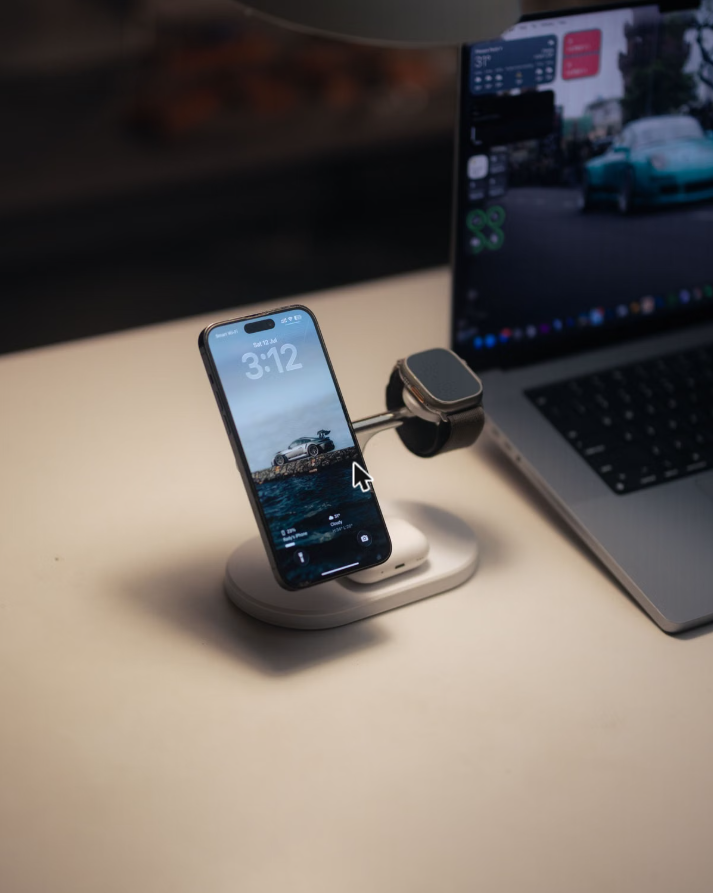
On paper, this is the nicest-looking wireless charging station of the two — an upright stand that keeps the phone at eye level for video calls, with faster Apple Watch charging than the first-gen version and support for the newer iPhone 17 series. It’s the one I’d pick for a fixed desk you’re not moving.
But there’s a complaint pattern I can’t leave out: a long-running owner support thread, spanning more than ten pages, documents chargers that develop intermittent charging — devices disconnecting and reconnecting overnight — or stop charging one pad entirely while the others keep working, with the AirPods spot the most frequently affected. The leading theory among owners is a failed firmware update rather than a hardware defect. The reassuring part: Belkin’s RMA process has a solid track record of replacing affected units, in some cases even after the standard warranty window, though live-chat support has been hit-or-miss for people trying to get a replacement in the first month. If you buy this one, register it and keep the receipt.
- Upright design keeps the phone visible for calls
- Faster Apple Watch charging than the previous generation
- Belkin has generally honored warranty replacements
- A recurring intermittent-charging complaint, most often on the AirPods pad
- Live-chat support reportedly inconsistent on early replacements
- Premium price tier for what it does
Buying Guide: What Actually Matters in a Wireless Charging Station
1. Qi2 certification, not just “MagSafe compatible”
Qi2 is the wireless charging standard that added a ring of magnets to the charging coil, so the phone snaps into perfect alignment instead of drifting off-center mid-charge — which is the single biggest cause of slow or stalled wireless charging. A “MagSafe compatible” station without Qi2 certification can still work, but alignment and charging speed are far more consistent on a certified one. All three picks above are Qi2-certified.
2. How many devices you’ll actually dock at once
Every 3-in-1 wireless charging station charges a phone, a watch, and earbuds, but most people only ever use two of the three slots regularly. If you don’t wear a smartwatch, a simpler 2-in-1 or single pad frees up desk space and usually costs less — don’t pay for a slot you won’t use.
3. Desk footprint and cable routing
A vertical stand (like the Belkin pick) takes up less desk surface than a flat multi-pad layout, but it needs enough vertical clearance under a monitor arm or shelf. Check the included cable length too — a short cable forces the charger right next to your only nearby outlet, which isn’t always where you want it on the desk. Once it is placed, our guides to cable management for your desk and where to buy cable management solutions cover the routing side.
4. Base stability over looks
This is the spec nobody lists but reviewers talk about constantly. A heavier base or a metal post resists sliding when you’re placing or removing a phone one-handed; a lighter foldable design trades that stability for portability. Decide which one matters more for where the charger will actually live.
5. Warranty and return policy, especially on multi-device stands
3-in-1 stations have more that can go wrong than a single pad — more coils, more firmware, more moving parts. A documented warranty and an RMA process that actually works are worth more here than on a basic single-pad charger, and it’s worth registering the product the day it arrives rather than digging up a receipt months later.
FAQ
Anker MagGo 3-in-1 Qi2 Foldable Charging Station
It’s the wireless charging station with the fewest recurring complaints in reviews, it charges all three devices at a speed people are actually happy with, and the portability means it’s useful whether you work from one desk or three. The other two picks above are good — just go in knowing what you’re trading for the price.
See Anker MagGo on AmazonQuick Takeaways
- Qi2 certification matters more than wattage — it’s what keeps your phone aligned and charging at full speed.
- The Anker MagGo’s main advantage is portability; its tradeoff is a lighter, less stable base.
- The Belkin 2nd-gen stand looks the most premium but has a documented intermittent-charging complaint pattern — register it on arrival.
- Only pay for all three charging slots if you’ll actually use all three devices — a watch slot you never use is wasted desk space.
Both of these wireless charging stations are Qi2-certified, which matters more than people realize — Qi2 standardizes the magnetic alignment so your phone actually seats correctly instead of trickle-charging off-center. If you want the technical details behind that standard, the Wireless Power Consortium’s Qi2 page breaks down what changed from Qi1. Whichever wireless charging station you pick, confirm it’s Qi2-certified before you buy. For what else belongs on a hybrid desk, our hybrid work essentials checklist covers the next purchases worth making.