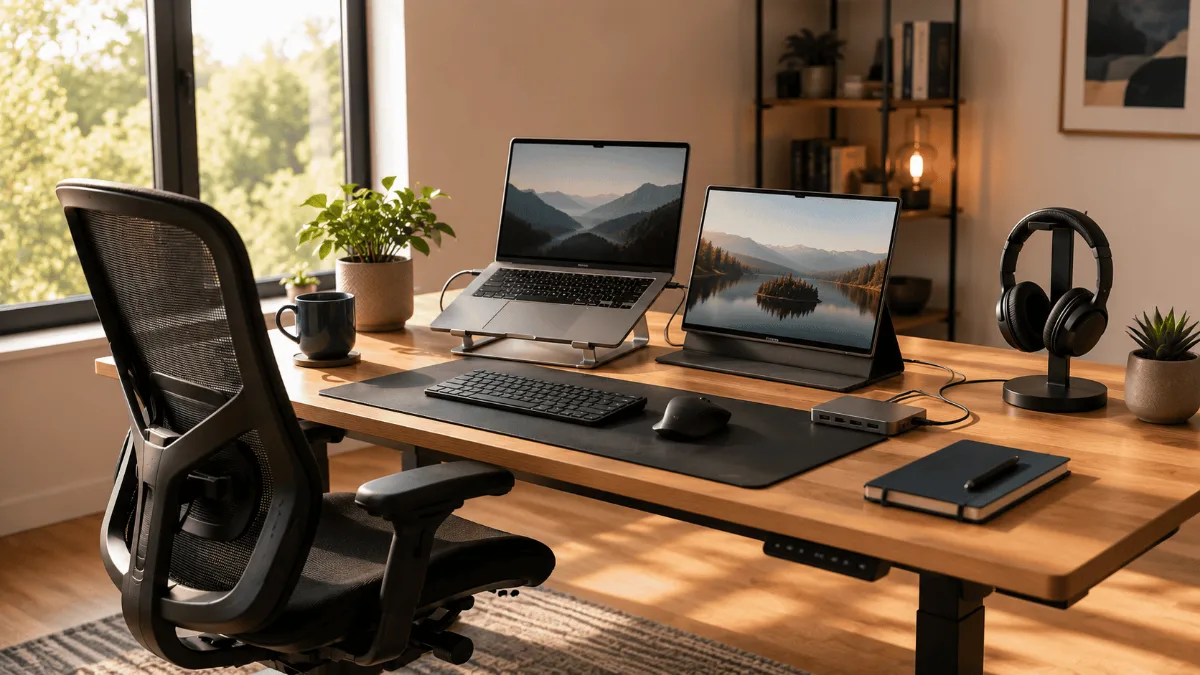
Complete Hybrid Work Essentials Checklist (2026)

This hybrid work essentials checklist is ordered rather than exhaustive. Anyone can list the gear a hybrid setup could have — the useful version tells you which piece to buy next, and which ones can wait until the budget refreshes without costing you anything.

🏆 The Complete Setup Verdict

Best foundation: FlexiSpot E6 MAX — the standing desk that shows up in every “still using it 3 years later” review. The dual-motor frame holds up to real daily use in a way budget desks don’t.

Best desk if budget is the constraint: Fezibo Electric Standing Desk — the most reviewed budget option for a reason. Consistent review scores, reliable motor, and a frame that’s smaller than most competitors.

Best for calls and video: Logitech C920x + Sony WH-1000XM5 — the combination that shows up in more hybrid worker setups than any other pairing. The webcam is plug-and-play reliable; the headphones cancel noise that derails every open-plan call.

Best connectivity layer: Anker 577 Docking Station — 13 ports, one cable to the laptop. The consistent top recommendation for MacBook and USB-C Windows users who want a clean desk without a cable nest.

The full checklist above isn’t about buying everything at once — it’s about knowing which piece to add next. Start with the desk and chair, then the audio layer, then connectivity.

⚡ Hybrid Work Essentials — Quick Checklist

📹 WebcamLogitech C920x or Anker C200 — upgrade built-in
🎧 HeadphonesSony XM5 or Anker Q45 — noise cancellation
🔌 Hub/DockAnker 577 or 7-in-1 USB-C hub
💺 ChairErgonomic with adjustable lumbar — non-negotiable
📶 Internet50Mbps+ with mesh Wi-Fi if multi-floor home
📢 This post contains affiliate links. Full disclosure here.
Updated September 2026
Splitting the week between a home office and corporate HQ puts specific demands on your gear, and the review corpus makes clear which pieces actually earn their place. Nothing kills productivity like fighting with a wobbly desk, squinting at your laptop screen, or dealing with echo-y audio on calls. After going through the reviews on dozens of products and spending way too much of my own money on trial and error, I’ve narrowed down the absolute must-haves for any hybrid setup. Some of these items transformed my workday completely, while others saved me from those embarrassing “can you hear me now” moments. So yeah, this is everything you actually need to work seamlessly from anywhere — no fluff, just the gear that genuinely works.
⭐ Start Here

FlexiSpot E6 MAX Standing Desk

The foundation of any solid hybrid setup. Dual motors, rock-solid stability, and memory presets that actually remember your heights. Owners report 18 months and beyond with zero issues. Check Price on Amazon →

The Complete Hybrid Work Setup

Essential Best For Get It
FlexiSpot E6 MAX Daily sit/stand Check →
HON Ignition 2.0 Chair All-day comfort Check →
Logitech C920x Webcam Video calls Check →
Sony WH-1000XM5 Focus & calls Check →
Nulaxy C1 Stand Laptop ergonomics Check →

Foundation: Desk & Chair Setup

Best Overall
1. FlexiSpot E6 MAX Standing Desk
The hybrid worker’s desk that actually lasts
330 lbs
Weight Limit
4
Memory Presets
23.6″-49.2″
Height Range
Owners who have run this desk for over a year consistently call it the one piece of gear they would not give up. The dual-motor system moves smoothly without wobbling the monitors on top, and the four memory presets get singled out repeatedly — no guessing where the right height is. The anti-collision feature saving a coffee mug is a story that turns up more than once in the reviews, and the cable management tray gets steady praise. Assembly time clusters around 45 minutes, but the instructions are clear and the build quality is obvious right out of the box. What really sold me is how stable it stays even at full height. I’ve got two 27-inch monitors and a laptop on mine, and there’s zero shake when I’m typing. That’s the difference between a desk that works and one that drives you crazy.
What owners love
  • Dual motors eliminate wobbling completely
  • Memory presets that actually remember your settings
  • Anti-collision tech prevents expensive accidents
  • Cable management keeps everything organized
  • Stable at any height with heavy monitor setups
What keeps coming up
  • Heavy at 72 pounds — plan for help during setup
  • Assembly takes 30-45 minutes
  • Premium price vs budget options
My take: If you’re serious about hybrid work, this is the desk to get. Yes, it costs more than basic options, but the stability and features make it worth every penny when you’re using it 8+ hours daily.
See Current Price →
Budget Pick
2. Fezibo Electric Standing Desk
Solid starter desk without breaking the bank
176 lbs
Weight Limit
3
Memory Presets
28″-46″
Height Range
Plenty of owners run this Fezibo desk for months before upgrading, and it’s a solid choice for getting started with standing desks. The single motor is slower than dual-motor options, but it gets the job done quietly. The 55-inch surface gives you plenty of room for a dual monitor setup, and the cable tray underneath keeps things reasonably tidy. Build quality feels good for the price point, though you’ll notice some vibration at full height with heavier loads.
What owners love
  • Great value for money at this price point
  • Quiet operation won’t disturb video calls
  • Spacious 55-inch work surface
  • Includes cable management tray
  • Three memory presets cover most needs
What keeps coming up
  • Single motor means slower adjustment
  • Some wobble at maximum height
  • Lower weight capacity than premium options
My take: Perfect for testing the standing desk waters without a huge investment. If you discover you love the sit-stand lifestyle, you can always upgrade later.
View on Amazon →
Best Chair
3. HON Ignition 2.0 Chair
Ergonomic support that won’t drain your budget
300 lbs
Weight Capacity
Mesh
Back Material
Adjustable
Lumbar Support
After trying chairs three times this price, I keep coming back to the HON Ignition. The lumbar support hits exactly where I need it, and the mesh back keeps me cool during long video call marathons. The seat cushion maintains its shape even after months of daily use, which is more than owners say for most budget chairs in this bracket. Armrests adjust to the perfect height for typing, and the tilt mechanism feels smooth and controlled. Sure, it doesn’t have all the bells and whistles of premium chairs, but it nails the basics that actually matter for hybrid work comfort.
What owners love
  • Lumbar support hits the right spot
  • Mesh back prevents overheating
  • Seat cushion stays firm over time
  • Smooth tilt and height adjustment
  • Great value compared to premium options
What keeps coming up
  • Limited recline range
  • Armrests aren’t the most adjustable
  • Assembly instructions could be clearer
My take: This chair proves you don’t need to spend that much to get proper ergonomic support. It covers all the essentials without the premium price tag.
Check Availability →
Premium Option
4. Secretlab Titan Evo 2026
Premium comfort for serious hybrid workers
330 lbs
Weight Capacity
Magnetic
Lumbar Type
5 Years
Warranty
If budget isn’t a concern and you want the absolute best seating experience, the Titan Evo is worth considering. The magnetic lumbar system is brilliant — it adjusts perfectly to your spine’s natural curve without any knobs or levers. Build quality is exceptional, and the materials feel like they’ll last decades. The 4D armrests adjust in every direction imaginable, and the cold-cure foam maintains its shape even after marathon work sessions.
What owners love
  • Magnetic lumbar system is genuinely innovative
  • Premium materials throughout
  • 4D armrests adjust perfectly
  • Cold-cure foam stays comfortable all day
  • 5-year warranty shows manufacturer confidence
What keeps coming up
  • Premium pricing puts it out of reach for many
  • Heavy at 66 pounds
  • Gaming aesthetic might not fit all offices
My take: This is the chair for people who spend 8+ hours daily at their desk and want zero compromises on comfort. The price is steep, but the quality justifies it.
Check Price on Amazon →

Video & Audio Essentials

Best Webcam
5. Logitech C920x HD Pro
The gold standard for video calls
1080p
Video Quality
Dual Stereo
Microphones
78°
Field of View
This webcam has been my go-to for three years, and it’s the one I recommend to everyone starting hybrid work. The 1080p video is crisp without being overkill, and the dual microphones pick up my voice clearly even in noisy environments. Setup is literally plug-and-play — no drivers needed, works instantly with Zoom, Teams, and everything else. The autofocus keeps you sharp even when you move around, and the color correction makes you look good in various lighting conditions. For the price point, nothing else comes close to this reliability. I’ve seen people spend twice as much on webcams that don’t perform as well as the C920x.
What owners love
  • Plug-and-play setup with all platforms
  • 1080p quality is perfect for video calls
  • Dual mics reduce background noise
  • Autofocus works reliably
  • Great value for money
What keeps coming up
  • No built-in privacy shutter
  • Fixed focus can be limiting for some setups
  • Plastic build feels basic
My take: This is the webcam to get if you want reliable video quality without overthinking it. Works great, costs little, lasts forever.
See It on Amazon →
Best Headphones
6. Sony WH-1000XM5
Noise cancellation that actually works
30 Hours
Battery Life
Active
Noise Cancelling
Multipoint
Bluetooth
These headphones changed my work-from-home experience completely. The noise cancellation is so good that I can focus in a coffee shop just as well as in a quiet office. When my neighbor’s dogs are barking or construction is happening outside, these just make it all disappear. The multipoint connection is clutch for hybrid work — I stay connected to both my laptop and phone, so I never miss important calls. Battery life easily lasts through multiple long workdays, and the comfort is perfect for wearing 6+ hours straight. Call quality surprised me too. The microphones do a great job isolating my voice from background noise, so people on the other end hear me clearly even in noisy environments.
What owners love
  • Best-in-class noise cancellation
  • 30-hour battery lasts for days
  • Multipoint connects to laptop and phone
  • Comfortable for extended wearing
  • Excellent call quality
What keeps coming up
  • Don’t fold for travel
  • Premium price point
  • Touch controls take getting used to
My take: If you work from home regularly and need to focus despite distractions, these headphones pay for themselves in productivity gains.
Grab One on Amazon →
Budget Audio
7. Anker Soundcore Q45
Solid noise cancellation without the premium price
50 Hours
Battery Life
Active
Noise Cancelling
LDAC
Audio Codec
Plenty of owners live with these Ankers for months before moving to premium headphones and they’re surprisingly capable. The noise cancellation isn’t Sony-level, but it handles typical office noise and household distractions well enough. The 50-hour battery life is actually better than more expensive options, and they’re comfortable for long video call sessions. Sound quality is good for the price, though audiophiles will notice the difference compared to premium models.
What owners love
  • Incredible 50-hour battery life
  • Decent noise cancellation for the price
  • Comfortable over-ear design
  • LDAC support for high-quality audio
  • Great value proposition
What keeps coming up
  • ANC not as strong as premium options
  • Build quality feels less premium
  • Call quality just okay
My take: Perfect starter headphones for hybrid work. They cover the basics well and the battery life is unbeatable at this price point.
Check Price on Amazon →

Laptop & Connectivity

Best Stand
8. Nulaxy C1 Laptop Stand
Simple solution for laptop ergonomics
44 lbs
Weight Capacity
6
Angle Options
Aluminum
Material
This little stand solves the biggest laptop ergonomics problem — screen height. Instead of craning down at the screen all day, it sits at eye level and you type on an external keyboard. The aluminium construction is the detail MacBook owners single out. Six different angles mean you can find the exact position that works for your setup, and the rubber pads keep everything from sliding around. For what it costs, this stand delivers more than its spec sheet suggests. It’s sturdy enough for my 16-inch MacBook Pro and doesn’t take up much desk space when not in use.
What owners love
  • Solid aluminum construction
  • Six angles cover most needs
  • Stable with heavy laptops
  • Matches Apple laptop aesthetics
  • Folds flat for travel
What keeps coming up
  • No built-in ventilation features
  • Limited height adjustment range
  • Requires external keyboard for comfortable typing
My take: Essential for anyone using a laptop as their primary work machine. The ergonomic improvement is immediate and the price is unbeatable.
See Current Price →
Best Dock
9. Anker 577 USB-C Dock
Turn one port into a complete workstation
13
Total Ports
Dual 4K
HDMI Output
85W
Power Delivery
This dock transformed my laptop setup from a tangle of adapters to a single-cable solution. One USB-C connection gives me two 4K monitors, all my peripherals, ethernet, and charges my laptop at the same time. The build quality is typical Anker — solid and reliable. Thirteen ports means owners rarely report running out of connections, and the 85W power delivery handles a MacBook Pro without issues. The dual HDMI outputs support 4K at 60Hz, which is perfect for my monitor setup. Setup is straightforward, and it works consistently across different laptop models. No driver installations or configuration hassles — just plug and go.
What owners love
  • Single cable connects everything
  • Dual 4K HDMI outputs
  • 85W charging handles most laptops
  • 13
    🏆 The Complete Setup Verdict

    Best foundation: FlexiSpot E6 MAX — the standing desk that shows up in every “still using it 3 years later” review. Dual-motor frame holds up to real daily use in a way budget desks don’t.

    Best budget desk: Fezibo Electric Standing Desk — the most-reviewed budget option for a reason. Consistent scores, reliable motor, and a frame that’s smaller than most competitors.

    Best for calls and video: Logitech C920x + Sony WH-1000XM5 — the combination that appears in more hybrid worker setups than any other pairing. The webcam is plug-and-play reliable; the headphones cancel noise that derails every open-plan call.

    Best connectivity layer: Anker 577 Docking Station — 13 ports, one cable to the laptop. The consistent top pick for MacBook and USB-C Windows users who want a clean desk without a cable nest.

    The full checklist above isn’t about buying everything at once — it’s about knowing which piece to add next. Start with desk and chair, then the audio layer, then connectivity.

    Frequently Asked Questions

    What are the essential items for hybrid work?

    The non-negotiable hybrid work essentials are: a reliable laptop with long battery life, a quality webcam (built-in cameras are rarely adequate), a USB-C hub or docking station for office peripherals, noise-cancelling headphones for calls, and a portable laptop stand. These five items cover the core requirements for working productively from any location.

    How do I set up a seamless hybrid work routine?

    The key is consistency: keep the same start/end times regardless of location, have a dedicated home workspace (even a specific chair and corner), and standardise your tech setup so you’re not reconfiguring devices each day. A docking station at home lets you plug in one cable and have monitors, keyboard, mouse, and ethernet connected instantly.

    What tech do I need for hybrid video calls?

    Minimum for good call quality: external webcam (720p+), external microphone or headset with mic, stable internet (50Mbps+ recommended for HD video calls). For important calls: ring light or window light from the side, camera at eye level, quiet background. The single biggest upgrade for most hybrid workers is replacing the built-in laptop webcam with an external one.

    How do I stay productive when switching between home and office?

    Use cloud storage (Google Drive, OneDrive, Dropbox) for all files — nothing should live only on a local drive. Keep a physical or digital task list that you update at end of day. Use a portable workspace kit (stand, hub, cable) that moves with you. Schedule deep work for home days (fewer interruptions) and collaborative work for office days.

    Not sure what to buy first? We broke down how to sequence a smart home office setup — which upgrade fixes the biggest daily problem, and the one most people buy far too early.