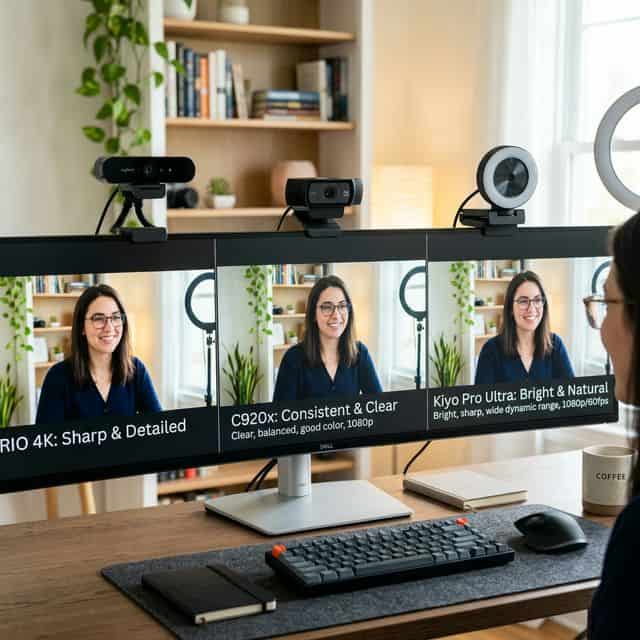
Logitech C920 vs C922 vs Brio is a comparison of three cameras that look nearly identical in a listing and behave differently on a call. The gap is not resolution. It is autofocus behaviour, low-light handling, and which one quietly does its job for years.
| 🥇 Best overall | Logitech Brio 500 — better color, privacy shutter, Show Mode |
| 💰 Best budget | Logitech C920s — proven image quality, wide compatibility |
| ⚠️ Skip | Logitech C922 — only worth it if you stream at 60fps |
If you’ve ever searched for a webcam for Zoom calls, you’ve probably landed on a Logitech — and then immediately gotten confused. C920? C922? Brio 500? They all look similar, the names blur together, and the price gaps don’t obviously explain what you’re getting more of.
I’ve spent hours comparing these three on the evidence — spec sheets side by side, sample footage in different lighting, and what owners report about the built-in mics on real video calls. Here’s the breakdown so you can stop overthinking it and just pick the right one.
The short answer: Most hybrid workers should get the Brio 500. It’s the newest, has the best low-light performance, and uses USB-C. But if you’re on a budget, the C920s at around the mid-range bracket is still shockingly good for the money. The C922 sits awkwardly in the middle — hard to recommend in 2026.
Logitech C920 vs C922 vs Brio 500 — specs compared
| Feature | C920s HD Pro | C922 Pro Stream | Brio 500 |
|---|---|---|---|
| Resolution | 1080p/30fps | 1080p/30fps, 720p/60fps | 1080p/30fps, 720p/60fps |
| Field of view | 78° | 78° | 90° / 78° / 65° (adjustable) |
| Autofocus | Yes | Yes | Yes (improved) |
| Low-light correction | Basic | Basic | RightLight 4 (AI-powered) |
| Auto-framing | No | No | Yes (RightSight) |
| HDR | No | No | Yes |
| Show Mode | No | No | Yes (top-down desk view) |
| Privacy shutter | Yes (external clip) | No | Yes (built-in rotary) |
| Microphone | Dual stereo | Dual stereo | Dual noise-reducing |
| Connection | USB-A | USB-A | USB-C |
| Software | LogiTune | LogiTune | LogiTune (full features) |
| Street price (2026) | Budget | Mid-range | Premium |
| Amazon Price (2026) | Check Price on Amazon → | See Current Price → | View on Amazon → |
Logitech C920s HD Pro — the budget king that refuses to retire
The C920 has been around for over a decade, and it’s still one of the best-selling webcams on Amazon. That tells you something. The current version (C920s) added a privacy shutter, but the core camera is essentially the same — and that’s fine, because the core camera is really good for the price.
At 1080p/30fps, the image quality is surprisingly clean in decent lighting. Colors are a bit warm, skin tones lean slightly orange, but it’s the kind of “slightly off” that most people won’t notice on a Zoom call. In low light, it struggles — the image gets grainy and soft quickly. But for a well-lit home office or near a window, it holds its own against webcams twice its price.
The built-in stereo mics are passable — your coworkers will hear you clearly enough, but there’s no noise cancellation, so they’ll also hear your dog, your doorbell, and your upstairs neighbor’s questionable music taste. If you take calls seriously, pair it with a dedicated mic or headset.
Best for
Budget-conscious hybrid workers with decent lighting. People who just need a reliable webcam that’s miles better than their laptop’s built-in camera. First-time webcam buyers who don’t want to overthink it.
Logitech C922 Pro Stream — the awkward middle child
I’ll be honest — the C922 is the hardest to recommend in 2026. When it launched, the big selling point was 720p at 60fps for streaming. But here’s the thing: 720p looks pretty rough by today’s standards, and most streaming platforms support 1080p. At 1080p, it shoots the same 30fps as the C920 — so you’re paying more for a feature (720p/60fps) that most people won’t use.
The image quality at 1080p is nearly identical to the C920. Maybe marginally sharper in some lighting conditions, but not enough to justify the price difference. It comes with a tripod (nice), but no privacy shutter (not nice — the C920s actually has one now).
The C922 was the “pro” choice in 2018. In 2026, it’s stuck between the C920’s better value and the Brio 500’s genuinely better technology. Unless you find one on deep discount — there’s no compelling reason to pick it.
Best for
Streamers who specifically need 720p/60fps (rare these days). People who find it on sale for less than the C920. Honestly? Not many people in 2026.
Logitech Brio 500 — the one to get if budget allows
The Brio 500 is what happens when Logitech finally updates their webcam formula after a decade. Same 1080p/30fps on paper, but in practice, the image quality is noticeably better — sharper details, more accurate colors, and significantly better handling of tricky lighting situations.
The RightLight 4 technology is the real star here. If you’ve ever had a window behind you and looked like a witness protection silhouette on a Zoom call, you’ll appreciate how the Brio 500 handles backlighting. It actively adjusts exposure to keep your face properly lit even when the background is much brighter. Sit with your back to a sunny window and the C920 turns you into a shadow — that complaint repeats constantly in the reviews. On the Brio 500, I looked normal. That alone is worth the upgrade for a lot of people.
The adjustable field of view (90°, 78°, or 65°) is surprisingly handy. Wide angle for showing your whole desk setup on a Show Mode presentation. Narrow angle for a tight face shot that hides your messy room. And the built-in rotary privacy shutter feels premium — a smooth twist to close, no clip-on plastic needed.
USB-C connectivity is also a welcome change. If your laptop only has USB-C ports (like most modern MacBooks), you won’t need a dongle. Small detail, big convenience.
Best for
Hybrid workers who take frequent video calls and want to look their best without buying a ring light. People with imperfect lighting — home offices with windows behind them, rooms that are too dark, or lighting that changes throughout the day. Anyone ready to invest in a webcam they won’t need to replace for 5+ years.
Where each webcam wins — head to head
Video quality in good light
All three are surprisingly close in a well-lit room — the differences are subtle. The Brio 500 has a slight edge in sharpness and color accuracy, but if your office has good overhead lighting or sits near a window, even the C920 looks perfectly professional on a Zoom call. Winner: Brio 500 (by a small margin).
Video quality in bad light
This is where the gap gets wide. The C920 and C922 both get noticeably grainy in dim lighting — details get soft, colors wash out, and you start to look like a grainy surveillance camera. The Brio 500’s RightLight 4 technology keeps the image usable in conditions where the older cameras basically give up. If your home office lighting isn’t great, this single feature justifies the price difference. Winner: Brio 500 (by a lot).
Audio quality
None of these webcams have truly good microphones — but the Brio 500’s noise-reducing mics are meaningfully better than the C920/C922’s standard stereo mics. Background noise is reduced, and voices sound clearer. That said, if you take calls frequently, you should still use a dedicated headset or USB mic regardless of which webcam you choose. Winner: Brio 500.
Ease of setup
All three are plug-and-play. The C920 and C922 use USB-A, which works with every computer. The Brio 500 uses USB-C, which works directly with modern laptops but may need a dongle for older desktops. The Brio 500’s mounting clip feels more secure and less bulky. Winner: Tie (depends on your USB ports).
Value for money
The C920s at its usual price is hard to argue with. You get 90% of the video quality for less than half the price. The Brio 500 is worth it if you need better low-light performance or USB-C — but it’s over double the price. The C922 at its usual price offers the worst value of the three: barely better than the C920, significantly worse than the Brio 500. Winner: C920s.
Quick answers to common questions
Is the Brio 500 worth double the price of the C920?
If your lighting is decent, probably not — the C920 is perfectly fine. If your lighting is bad, or if you take client-facing calls where looking professional matters, then yes — the Brio 500’s low-light handling and color accuracy make a real difference.
Should I buy the C922 in 2026?
Only if you find it heavily discounted. At its its regular price it doesn’t offer enough over the C920 to justify the premium, and it falls far short of the Brio 500. save money and get the C920, or spend more and get the Brio 500.
Do I need a separate microphone with any of these?
For casual team calls, the built-in mics on all three are fine. For client presentations, interviews, or any situation where audio quality matters, pair your webcam with a USB mic or headset. The webcam mic is a backup, not your main audio source.
Will these work with Zoom, Teams, and Google Meet?
Yes — all three work plug-and-play with every major video conferencing platform. No drivers, no setup, no drama. Plug it in, select it as your camera in the app settings, done.
The verdict — which Logitech webcam should you buy?
For most hybrid workers, this comes down to a simple question: is your lighting good?
If yes — get the C920s, save money, and spend the difference on a good desk lamp or USB mic. You’ll look great on calls.
If no (or if you’re not sure) — get the Brio 500. The low-light correction, auto-framing, and USB-C connectivity make it the webcam you won’t regret buying. It’s the one I’d pick if I were setting up a new home office today.
And the C922? With respect to its years of service — it’s time to retire. Rest well, old friend.
Last updated: March 2026. Looking for webcam options outside of Logitech? Check out our best budget webcams under $50 roundup (coming soon).
Frequently Asked Questions
Logitech C920x vs C922 — what is the actual difference?
The C920x is a privacy-focused version of the C920 with a privacy shutter and no background replacement software. The C922 adds 720p/60fps mode (vs 720p/30fps on C920x) and a tripod. For Zoom and Teams calls at 1080p/30fps, they are functionally identical. The C922 is worth choosing only if you need the higher frame rate for streaming or video recording.
Is the Logitech BRIO worth the extra cost over the C920x?
The BRIO’s main advantages are 4K capture, Windows Hello facial recognition, HDR, and a wider 90° FOV. For standard video calls on Zoom or Teams (capped at 1080p), the BRIO offers minimal visual improvement over the C920x. The BRIO is worth the premium for content creation, 4K recording, or Windows Hello authentication. For calls-only use, the C920x delivers 90% of the experience at 40% of the price.
Do Logitech webcams work on Mac?
Yes — all Logitech webcams are plug-and-play on macOS without drivers. The Logi Tune app (optional, free) provides additional settings like zoom, FOV, and HDR control. Logitech webcams are fully compatible with FaceTime, Zoom, Teams, and Google Meet on macOS.
What is the best budget webcam for Zoom?
The Logitech C270 is the most reliable budget webcam for basic Zoom calls — 720p, fixed focus, works with every platform. For budget 1080p, the Anker PowerConf C200 is the strongest option: 2K resolution, dual microphones, and good low-light performance. Avoid unknown-brand webcams — autofocus and low-light quality are typically poor.
Best Webcams for Zoom Meetings · Logitech C920 vs C922 · Logitech BRIO vs C920X · Best Budget Webcams Under $50 · Best Ring Lights
Not sure you need one at all? We broke down is an external webcam worth it for hybrid work — when it pays off, and when your laptop camera is fine.